


Chrome Brave Edge Firefox Browser extension · 3x3

Did you scramble it right?

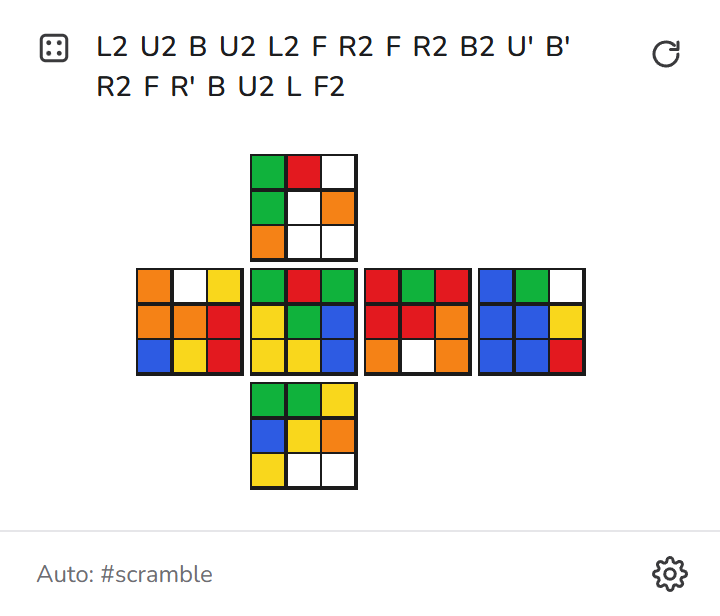
Scramble Preview reads the scramble on your timer or trainer site and shows the cube it should give you, laid out flat. Compare it with the cube in your hands and you'll know straight away if you made a mistake.

rubikstrainer.com/cross2f2l
SCRAMBLE
0.00

How it works

Three steps, and you only do the first one once per site.

1

Turn it on for the site

Every site starts off. Open the popup on your timer or trainer and switch it on. It stays on for that site.

2

It finds the scramble

It looks for the scramble text on the page by itself. If it picks the wrong thing, use ⚙ to type a CSS selector or click the scramble on the page.

3

Compare with your cube

Hold your cube with white on top and green in front, and check each face against the preview. When the site shows a new scramble, the preview updates.

Try it here

Type or paste a scramble below. Click a move, or drag the slider, to see the cube after that move.

0 / 0
U whiteF greenR red D yellowB blueL orange

Features

Small, quick, and it stays out of the way.

🔒

Off until you turn it on

It doesn't read any site until you enable it there, and it only runs when you open the popup.

🎯

Selector for each site

Each site can have its own CSS selector, like #scramble, or you can click the scramble on the page to set it.

🔄

Updates with the site

While the popup is open, the preview changes whenever the site shows a new scramble.

✏️

Edit the scramble

Click the scramble in the popup to fix a move or paste a different one.

🧩

Full notation

Face turns, ' 2 3, wide moves (Rw, r), slices (M E S) and rotations (x y z).

📴

Nothing sent anywhere

The cube is worked out inside your browser. No account, no tracking, no servers.

Install

Works in Chrome, Brave, Edge and other Chromium browsers, and in Firefox.

  1. Clone or download the repository from GitHub:
    git clone https://github.com/blueedgetechno/cube-scramble-preview.git
  2. Open chrome://extensions (or brave://extensions, edge://extensions) and turn on Developer mode.
  3. Click Load unpacked and pick the project folder.
  4. Go to a page such as rubikstrainer.com/cross2f2l, open the extension and turn it on.

Firefox: open about:debugging#/runtime/this-firefox, click Load Temporary Add-on… and choose manifest.json.

Scramble Preview popup showing the cube net

FAQ

Which way should I hold the cube?

White on top and green in front, which is the WCA scrambling orientation. The preview shows U on top, L F R B across the middle, and D at the bottom.

It didn't find the scramble on my site.

Open ⚙ and click Pick on page, then click the scramble text. You can also type a CSS selector yourself. It's saved for that site only.

Why is every site off at first?

So the extension never reads pages you didn't ask it to. You turn it on yourself for each site you use.

Does it work for 2x2 or 4x4?

No, only 3x3 for now.